

How to Troubleshoot Garage Door Photo Eye Sensors
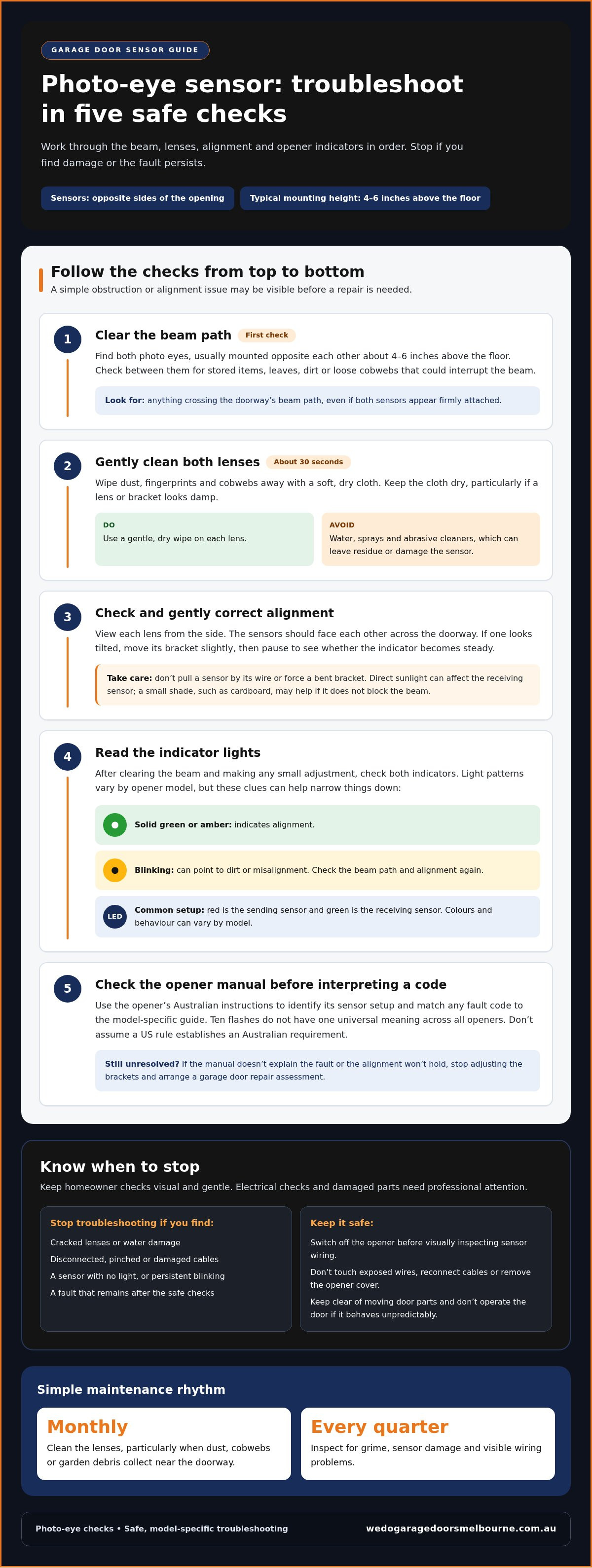
A blinking photo-eye sensor light usually signals an issue to check before arranging a repair. For garage door photo eye sensor troubleshooting, start by clearing the beam path and gently cleaning the lenses. The sensors are typically mounted four to six inches above the floor, one on each side of the opening. Solid green or amber lights indicate alignment, while blinking lights can point to dirt or misalignment.
It’s frustrating when a garage door won’t close and the cause isn’t obvious. This guide covers safe checks, what sensor lights and opener fault codes may mean, and how to recognise when the issue could involve wiring, moisture or damaged sensors rather than a simple obstruction.
Start with the beam path and lenses, then check alignment and indicator lights before deciding whether the fault needs a technician. This approach helps you address straightforward issues safely and recognise when it’s time to leave the repair to a professional.
Table of Contents
Door Won't Close, Light Blinking 10 Times, Or Sensors Beyond Aligning?
US requirements don’t establish Australian requirements for photo-eye sensors. Whether sensors are required for a particular opener depends on its design and applicable Australian requirements. Follow the opener’s Australian instructions rather than assuming a US rule applies.
Work through the checks in order: inspect the beam path, adjust sensor alignment, read the indicator lights, then compare any opener code with its manual.
Check sensor alignmentLocate both photo eyes, typically mounted four to six inches above the floor on opposite sides of the garage opening. Check that nothing blocks the beam, including stored items, leaves or dirt around the brackets. View each lens from the side to check that the sensors face each other across the doorway. Direct sunlight can affect the receiving sensor, so note whether the fault appears at a particular time of day.
Correct sensor alignmentGently adjust a sensor that looks tilted or points away from its partner. Move the bracket slightly so the lens faces across the opening, then pause to see if the indicator becomes steady. Don’t pull the sensor by its wire or force a bent bracket into position. If direct sunlight reaches the receiving lens, a small shield, such as cardboard, may help shade it without blocking the beam from the other sensor.
Read sensor indicator lightsCheck both indicator lights after clearing the beam and making any small adjustment. A solid green or amber light indicates alignment; a blinking light can point to dirt or misalignment. Some systems show one green and one red light, but colours and behaviour vary by opener model. If the green light is off or blinking, check again for an obstruction or poor alignment before assuming the sensor has failed.
Review sensor requirementsUse the opener’s Australian manual to identify its sensor setup and interpret its indicator pattern. Ten flashes don’t have one universal meaning across all openers, so match the count to the model-specific fault-code guide. Don’t treat a US date or standard as proof of an Australian requirement. If the manual doesn’t resolve the fault, or alignment won’t hold, stop adjusting the brackets and arrange a garage door repair assessment.
Cleaning sensor lenses
Switch off the opener before visually inspecting sensor wiring. Look for disconnected, pinched or damaged cables without touching exposed wires. A sensor with no light may have a power or wiring issue.
Wipe each lens gently. Use a soft, dry cloth to remove dust, cobwebs and fingerprints from both photo-eye lenses. A gentle wipe takes about 30 seconds and avoids scratching the lens. Don’t use water, sprays or abrasive cleaners, which can leave residue or damage the sensor. Keep the cloth dry, especially if the lens or bracket looks damp.
Check the beam path after cleaning. Look between the sensors for anything that could interrupt the beam, such as a leaf, stored item or loose web. Clear the obstruction, then watch the indicator lights as you test the door. If the lights settle, dirt or an obstruction may have caused the fault. Don’t keep operating the door if it behaves unpredictably.
Inspect the sensor bodies and visible cables. Look for a cracked lens, moisture on a sensor, a loose connection or pinched wiring. Sensor wires can become brittle, get caught by staples or be chewed by rodents. Don’t pull, cut, reconnect or handle exposed wiring. If a cable is damaged or a sensor has no light, leave electrical checks to a technician.
Check power without opening electrical components. Use the opener’s normal controls to confirm it has power, then see whether the sensor indicators illuminate. If both lights are off, or one stays off after cleaning, suspect a power or wiring issue rather than more dirt. Keep clear of moving door parts. Don’t remove the opener cover or probe wiring; visual inspection is the safe limit for a homeowner.
Set a regular cleaning routine. Clean the lenses monthly, particularly when dust, cobwebs or garden debris collect near the doorway. Inspect the sensors every quarter for grime, damage and visible wiring problems. If cleaning doesn’t resolve persistent blinking, or you find a cracked lens or water damage, stop troubleshooting. A garage door repair assessment can help identify whether the fault sits with the sensors, wiring or opener.
How photo eye sensors work
Identify the two parts. A photo-eye system has a sending sensor and a receiving sensor mounted on opposite sides of the garage opening. The sender directs a beam towards the receiver, creating a monitored path across the doorway. On common systems, the red indicator belongs to the sending sensor and the green indicator to the receiving sensor. Both units need to work together.
Understand the beam’s role. When the receiver detects the sender’s beam, the opener can treat the doorway as clear for closing. If an object crosses the path, the receiver no longer detects the beam. Depending on the opener’s design, it then prevents or interrupts closing. For example, a box in the doorway can break the beam even if both sensors are firmly attached.
Notice what interrupts the signal. A blockage isn’t the only possible cause of a broken beam. Misalignment can make the sender point past the receiver, while dust on a lens can interfere with detection. Direct sunlight may also affect the receiving sensor, making it behave as though the beam is interrupted. These issues can produce similar symptoms, so consider what changed around the doorway before assuming a sensor has failed.
Use the indicators as clues. The lights show whether each sensor is powered and whether the system is detecting the beam as expected. A solid green or amber light generally indicates alignment, while blinking can point to dirt or misalignment. If the green light is off or blinking, check the beam path and sensor position. A blinking green light can also relate to loose wiring, poor alignment or moisture damage, so the indicator alone doesn’t identify one definite cause.
Interpret the opener’s response. The opener uses information from the photo-eye system to control the door. If the beam is interrupted, the door may refuse to close or stop during its closing cycle. A flashing opener light or fault code can help narrow down the issue, but its meaning depends on the opener model. Check that model’s manual rather than assuming one code applies to every system.
Separate sensor faults from door faults. A photo eye monitors the opening; it doesn’t lift the door or fix mechanical problems. If the beam path is clear but the door still struggles, note whether the sensor indicators are steady and whether the opener reports a fault. This helps focus the next check on the sensor signal, visible wiring, opener behaviour or a separate door problem.
LED indicators and opener fault codes
Identify each sensor’s indicator. Check which light belongs to each photo eye before interpreting its behaviour. The red LED is the sending sensor, while the green LED is the receiving sensor. Note whether both are lit, either is blinking, and whether the lights change when the beam path is clear. This record helps distinguish a sensor warning from an opener display or fault code.
Compare the lights with the beam condition. Solid green or amber sensor LEDs indicate alignment; a blinking LED can indicate dirt or misalignment. If the green light is off or blinking, check for an obstruction or a shifted sensor. Watch the lights after clearing the path. If the pattern changes, the obstruction or sensor position may have affected the receiver’s signal.
Observe whether the fault comes and goes. A steady light that starts blinking as the door moves suggests an intermittent issue, not necessarily a failed sensor. A blinking green LED can indicate poor alignment, loose wiring or moisture damage. Note whether sunlight reaches the receiving sensor or whether the fault appears after rain. These details help narrow down what changed without treating one LED pattern as a definite diagnosis.
Read the opener display separately. Check the opener’s lights or screen and record any code or exact flash sequence. Don’t assume the same number of flashes means the same thing across every make and model. A ten-flash pattern, for example, needs to be interpreted using that opener’s instructions, not a code guide for another system. Note the model alongside the code when reviewing the manual.
Match the pattern to the manual. Use the opener manufacturer’s instructions to interpret the recorded LEDs and fault code. The manual may explain whether a pattern relates to the safety sensors or another opener condition. Compare its description with what you observed, such as a blinking green sensor light and a door that won’t close. Don’t change settings or disconnect sensors just to clear a warning.
Use repeated warnings to decide what to do next. If the sensor lights remain abnormal after the beam path is clear, note any cracked lenses, visible moisture or damaged wiring. A sensor with no light may have a power or wiring issue. Persistent blinking, damaged lenses or water damage can mean cleaning and basic alignment aren’t enough. Keep the code and light pattern handy when arranging a technical assessment.
When to call a garage door technician
Arrange a technician’s assessment if basic cleaning and alignment checks haven’t resolved the fault, or if you find damaged sensors or wiring. Stop at visual checks if the next step would involve opening electrical components or handling damaged cables.
Arrange an assessment for cracked or water-damaged sensors. A cracked lens can stop a photo eye from reliably detecting its beam. Moisture damage can also affect sensor operation. Don’t tape over a crack, dry a wet sensor with heat or keep adjusting a damaged unit. Note which sensor looks affected and whether its indicator changes to help explain the fault.
Get help for exposed, pinched or disconnected wiring. Sensor wires can become brittle, get pinched by staples or be chewed by rodents. Look without pulling or reconnecting them. A sensor with no light may have a power or wiring issue, which repeated lens cleaning won’t diagnose. Keep clear of exposed conductors and leave electrical repairs to a technician.
Call if blinking continues after straightforward checks. Clear the beam path, clean the lenses and make only a small alignment adjustment. If a light keeps blinking, the cause may involve loose wiring, moisture or a sensor fault. Note which indicator blinks and whether the issue changes with sunlight or weather. A technician can assess the sensor and its connection to the opener.
Stop using the door if its response is unpredictable. If it starts closing with the beam obstructed, reverses unexpectedly or responds inconsistently, don’t keep trying to operate it. Keep people and stored items clear of the doorway. A fault affecting the safety system needs attention before normal use resumes. Don’t bypass the sensors as a permanent workaround.
Escalate faults that remain after checking the opener instructions. Note the exact code or flash pattern and compare it with the manual for your opener model. If the code returns after the beam path is clear, don’t change settings to silence it. A technician can assess whether the issue lies with the sensors, wiring or opener, rather than treating every warning as an alignment problem.
Arrange a garage door repair when the fault is beyond visual checks. Share the opener model, the sensor light pattern and what you already tried. For persistent sensor faults or visible damage, arrange a garage door repair assessment rather than continuing to adjust or dismantle the system.
We Do Garage Doors: Garage door repairs
We Do Garage Doors can help if cleaning and alignment checks haven’t resolved a photo-eye fault. Its garage door repair service assesses persistent sensor warnings, damaged wiring and openers that don’t respond as expected. If the issue points to the motor rather than the sensors, the team also offers motor replacement.
Share the opener’s fault code, sensor light pattern and checks you’ve already tried. These details help explain what the door is doing and where the problem appears. If a sensor fault keeps returning or wiring looks damaged, stop adjusting the system and arrange a repair assessment. Contact We Do Garage Doors to discuss your repair.
Choose a safe next step for your garage door
Good garage door photo eye sensor troubleshooting isn’t about forcing the door to work. It’s about recognising when the system needs a closer look. If you’ve reached the limit of safe visual checks, note what the door does and describe the sensor or opener behaviour when arranging help. That gives the repair assessment a practical starting point.
We Do Garage Doors repairs faults that need professional attention. If an assessment identifies a separate mechanical problem, the team also offers motor and spring replacement. These services address different parts of the door system, so the right next step depends on the cause.
For a persistent fault or a door that behaves unpredictably, contact We Do Garage Doors to discuss a repair. With a clear account of the symptoms, you can move towards a safe, dependable solution.
Frequently Asked Questions
What are garage door photo-eye safety sensors, and why do they matter?
Photo-eye safety sensors work as a pair to monitor the garage door opening. If something interrupts the beam while the door is closing, the opener can stop or prevent the door from continuing. A child’s toy left across the doorway, for example, may break the beam. The sensors help the opener detect an obstruction, but they don’t replace keeping people and belongings clear of a moving door.
Is it safe to bypass your garage sensors?
No. Don’t leave garage door sensors bypassed or rely on an override for normal operation. Bypassing them removes the beam-based protection that helps detect objects in the doorway. If the door won’t close, use the opener’s instructions to understand the fault rather than disconnecting the sensors. Keep the opening clear and arrange a technician’s assessment if the safety system isn’t working as intended.
How do garage door photo-eye safety sensors work?
One sensor sends a beam across the doorway and the opposite sensor receives it. The opener uses the receiving signal to help determine whether the opening is clear for closing. A person, bicycle or parcel crossing the beam interrupts the signal, so the opener can prevent or interrupt the closing cycle. The sensors monitor the doorway but don’t detect every hazard outside the beam’s path.
What do blinking or solid lights on garage door photo eyes mean?
A solid green or amber sensor light indicates alignment, while a blinking light can point to dirt or misalignment. A blinking green light may also be associated with loose wiring or moisture damage. Watch whether the pattern changes as sunlight shifts across the doorway. Opener fault codes are model-specific, so follow your opener’s instructions instead of applying a flash-count interpretation from another model.
How do you clean and align garage door photo-eye sensors step by step?
First, clear the doorway and gently wipe each lens with a soft, dry cloth. Next, check that the sensors face each other and carefully adjust any tilted bracket. Pause to observe the indicator lights. Don’t pull the units by their wires or force a bracket. If a light remains abnormal, or you see cracked lenses or damaged wiring, stop and arrange a repair assessment.
How do you troubleshoot garage door sensors when the door won’t close?
For garage door photo eye sensor troubleshooting, start with simple checks: remove objects from the doorway, clear debris near each sensor and inspect the lenses. Then observe the indicators and note any opener code or flash sequence. A recycling bin just inside the opening, for example, may block the beam without touching either sensor. If the door still won’t close, avoid repeated attempts and arrange an assessment.
How can you test whether a garage door photo-eye sensor is faulty or miswired?
During garage door photo eye sensor troubleshooting, start with a visual check, not a wiring test. Look for a sensor with no indicator, a loose-looking connection, a pinched cable or visible damage. A missing light can point to a power or wiring issue but won’t identify the exact fault. Don’t disconnect wires, open the opener or test live connections. A technician can safely inspect the wiring and sensor operation.
Can sunlight, water, dirt or insects interfere with garage door photo eyes?
Yes. Direct sunlight can affect the receiving sensor, while dirt or insects on a lens can disrupt the beam. Moisture can damage a sensor or contribute to intermittent operation. If the fault appears in bright afternoon sun, note the timing and whether shading the receiver changes the indicator. Around Melbourne, including Greenvale, Craigieburn, Mickleham, Roxburgh Park and Wollert, check for cobwebs and debris around the doorway, but stop if you find water damage or a cracked lens.
Comments